
Multimodal Text-to-Image Pipeline
Background isolation and automated dynamic banner generation using in-memory processing.
At Dotkonnekt, we built an automated graphic banner generation system for campaign promotion. The main goal was to allow merchants to provide a subject image and a prompt, automatically isolating the subject from its original background, and then dynamically embedding it on a formatted canvas surrounded by a high-quality AI-generated setting.
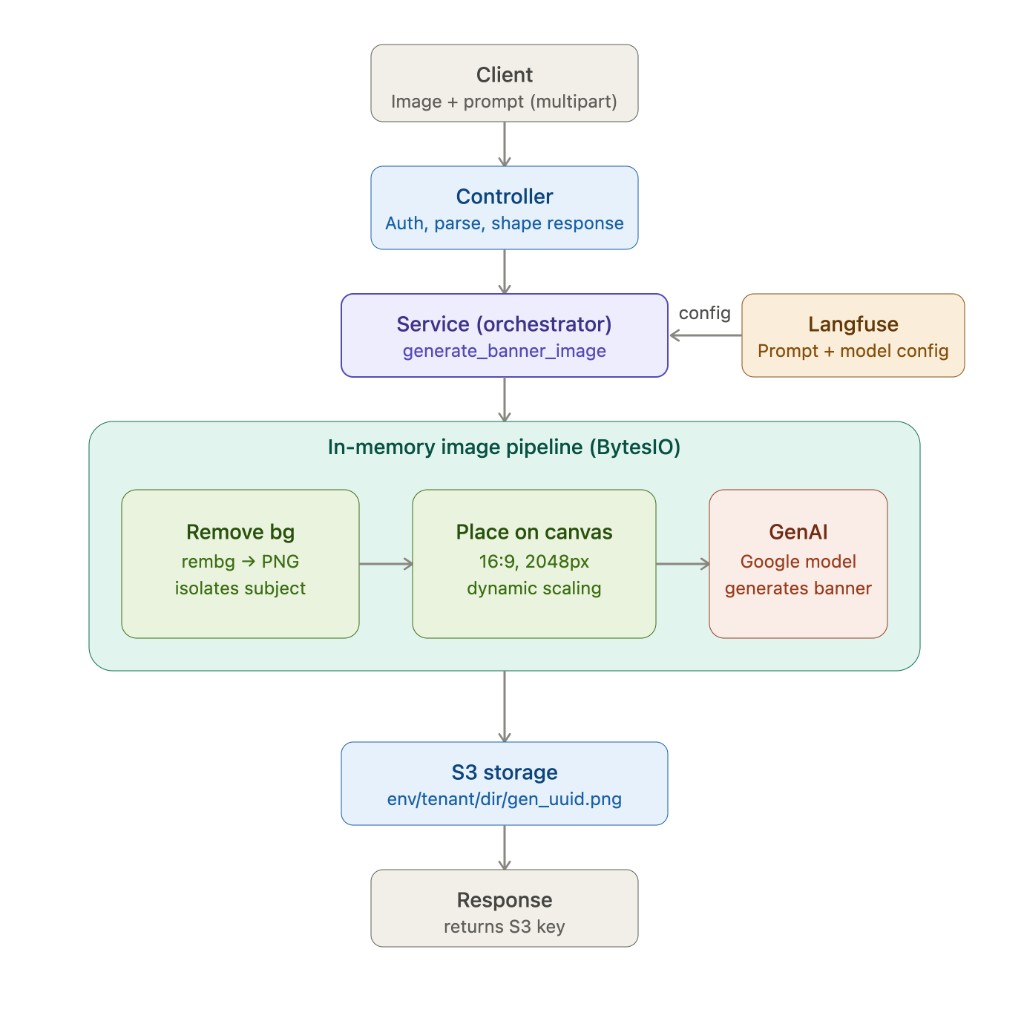
I designed and built the complete backend pipeline in Python. When a client submits a multipart request containing the raw image and prompt, a controller parses and validates the input. The orchestrator calls Langfuse to retrieve the optimized model configuration and prompt template, ensuring dynamic tuning without redeploying code.
The core processing occurs in an in-memory image pipeline (BytesIO): the subject background is stripped using the rembg library, placed onto a 16:9 2048px blank canvas using dynamic scaling algorithms, and passed to a Google GenAI model (e.g. Imagen) to generate the surrounding background. The output is stored on AWS S3 and its key is returned to the client.
End-to-end data flow through the pipeline.
Request Parsing and Validation
The controller authenticates the client, parses the multipart/form-data payload containing the subject image and the text prompt, and prepares the image bytes for processing in memory using BytesIO.
Dynamic Config via Langfuse
To avoid baking model configs and prompts in code, the orchestrator pulls live prompt template configurations and model hyperparameters directly from Langfuse at runtime.
Background Removal & Canvas Placement
The pipeline uses the rembg library to isolate the subject from the input image. It then initializes a 16:9 canvas (2048px width) and places the isolated subject onto it, dynamically scaling and centering the subject to leave natural margins.
Inpainting with Google GenAI
The composite canvas along with the text prompt is passed to Google's GenAI model. The model runs inpainting/outpainting to fill the blank areas of the canvas, blending the subject seamlessly into the newly generated background.
AWS S3 Storage
The generated high-resolution banner image is saved to AWS S3 using a tenancy-structured folder structure (`env/tenant/dir/gen_uuid.png`), and the S3 key is returned to the client.
Why each tool was chosen.
Background isolation
A lightweight, Python-based U2Net library that runs locally to isolate subjects from original image backgrounds efficiently.
Outpainting & banner generation
Provides state-of-the-art outpainting capabilities, accurately blending the custom canvas structure with high-resolution generated background scenes.
Prompt and model configuration management
Enables instant tweaking of the base generation prompt and model hyper-parameters without code redeploys, keeping operations highly agile.
Asset storage
Secure, durable, and highly available storage for the final generated image banners, keeping filenames clean with unique UUID structures.